Appearance
Project videos
What this screen is for: it holds the videos of one project, and the buttons that act on the project.
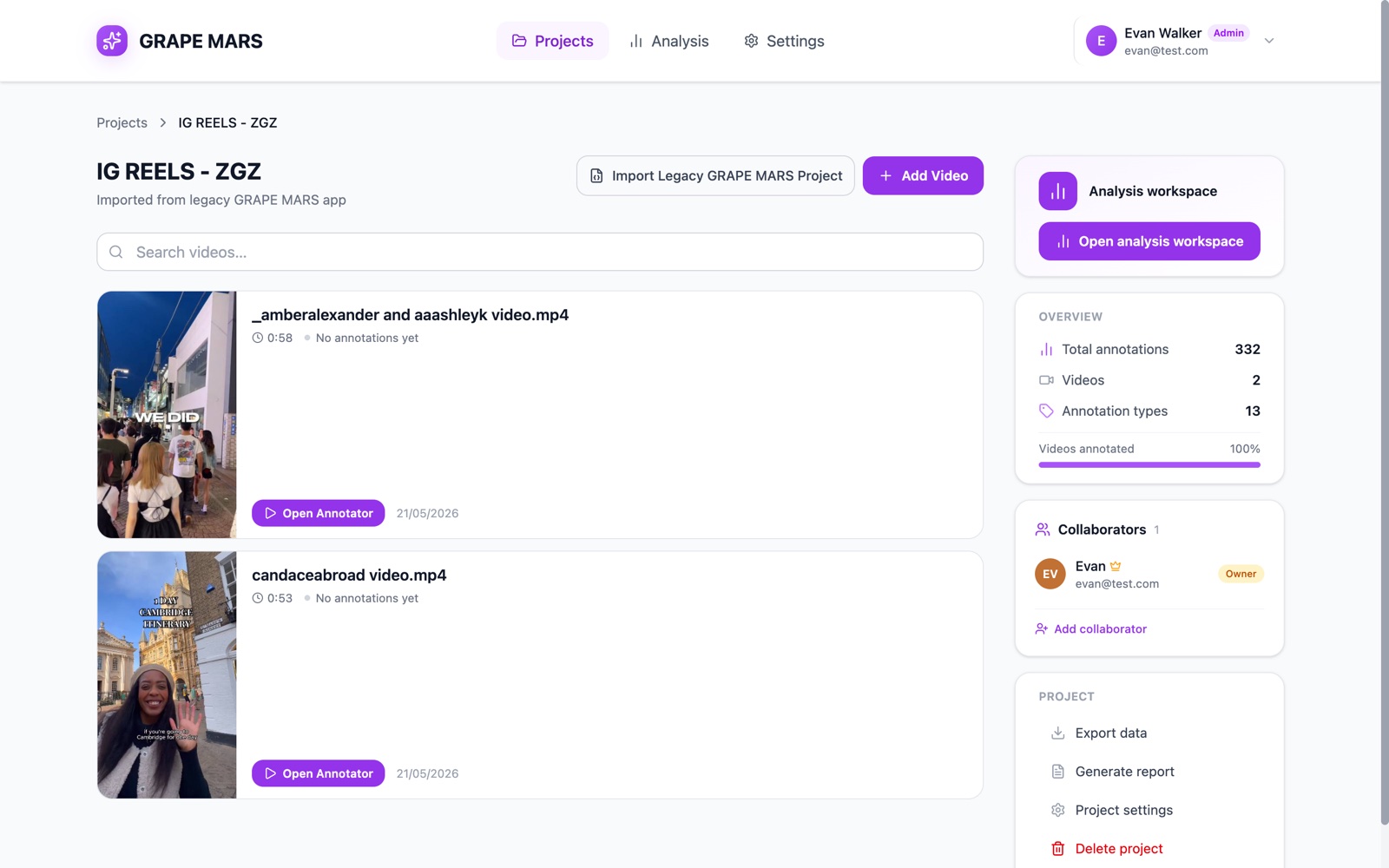
- Trail: Projects, then the project name. Click Projects to go back.
- Title: the project name, with its description below. Shared projects show small round faces beside the name.
- Add Video: opens the upload window. Beside it sits Import Legacy GRAPE MARS Project. Both show only for owners and editors.
- Search box: type here to keep only the rows whose name matches.
- Video row: a small picture, the file name, the length, a coloured dot, and how many annotations it has. The dot reads No annotations yet, Annotating or Annotation complete.
- Open Annotator: opens that video on the screen where you work. The picture and the name do the same.
- X: deletes that video. It shows when your mouse rests on the row.
- Analysis workspace: the purple card at the top right. Open analysis workspace opens your workspaces.
- Overview: counts for the whole project: total annotations and videos. It also shows how many annotation types the project's library has. A bar shows the share of videos with work on them. (Until the next update this number counts all the types you have ever created.)
- Collaborators: who shares this project, and the role each person has.
- Project: the last card. It holds Export data, Generate report, Project settings and, for owners, Delete project.
Actions you can take here
- Add videos to a project
- Open a video in the annotator
- Delete a video
- Read the project overview
- Delete a project