Appearance
Timeline
What this screen is for: placing your annotations in time, and reading them at a glance.
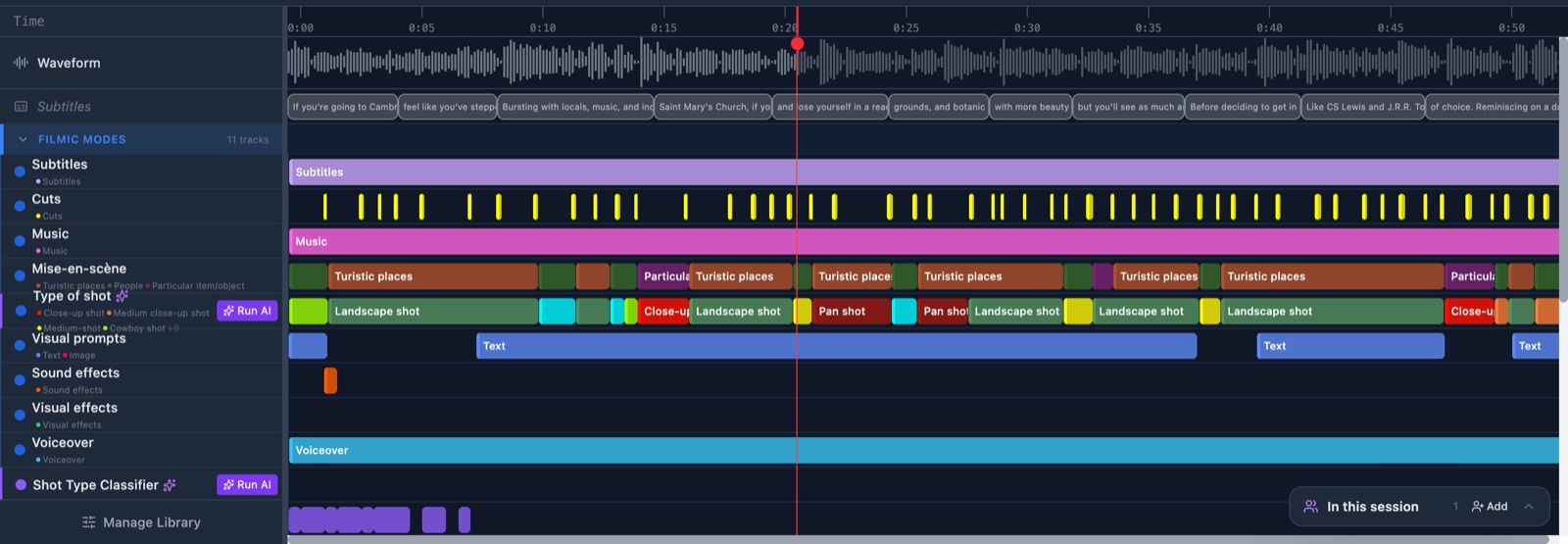
- Ruler: the times along the top. Click it to jump to a moment. The gap between ticks grows as you zoom in.
- Marker: the red line at the moment you are watching. Drag the round handle at its top to move it. It turns amber when it lands on the end of a bar.
- Waveform lane: the gray shape of the sound, right under the ruler.
- Subtitles lane: the subtitles, one block per line of the transcript. Click a block to jump to it.
- Group band: a faint tinted row for each category. A closed group shows its bars as small marks in one row.
- Track row: one row per track. The pointer is a cross here, because dragging makes a bar.
- Bar: one annotation. Its color comes from its annotation type, and the stripe on its left from its sub-type. A marked bar has a yellow ring.
- Dashed bar: a proposal from an AI model, with its confidence in the corner. See Review AI suggestions.
- Colored dot: sits on a bar that another coder made.
A bar with a dashed amber or red edge is not stored on the server. See How saving works.
Actions you can take here
- Create an annotation by dragging
- Move, resize or delete an annotation
- Edit an annotation
- Play, scrub and zoom the timeline