Appearance
Workspace
What this screen is for: building and reading one page of analysis modules.
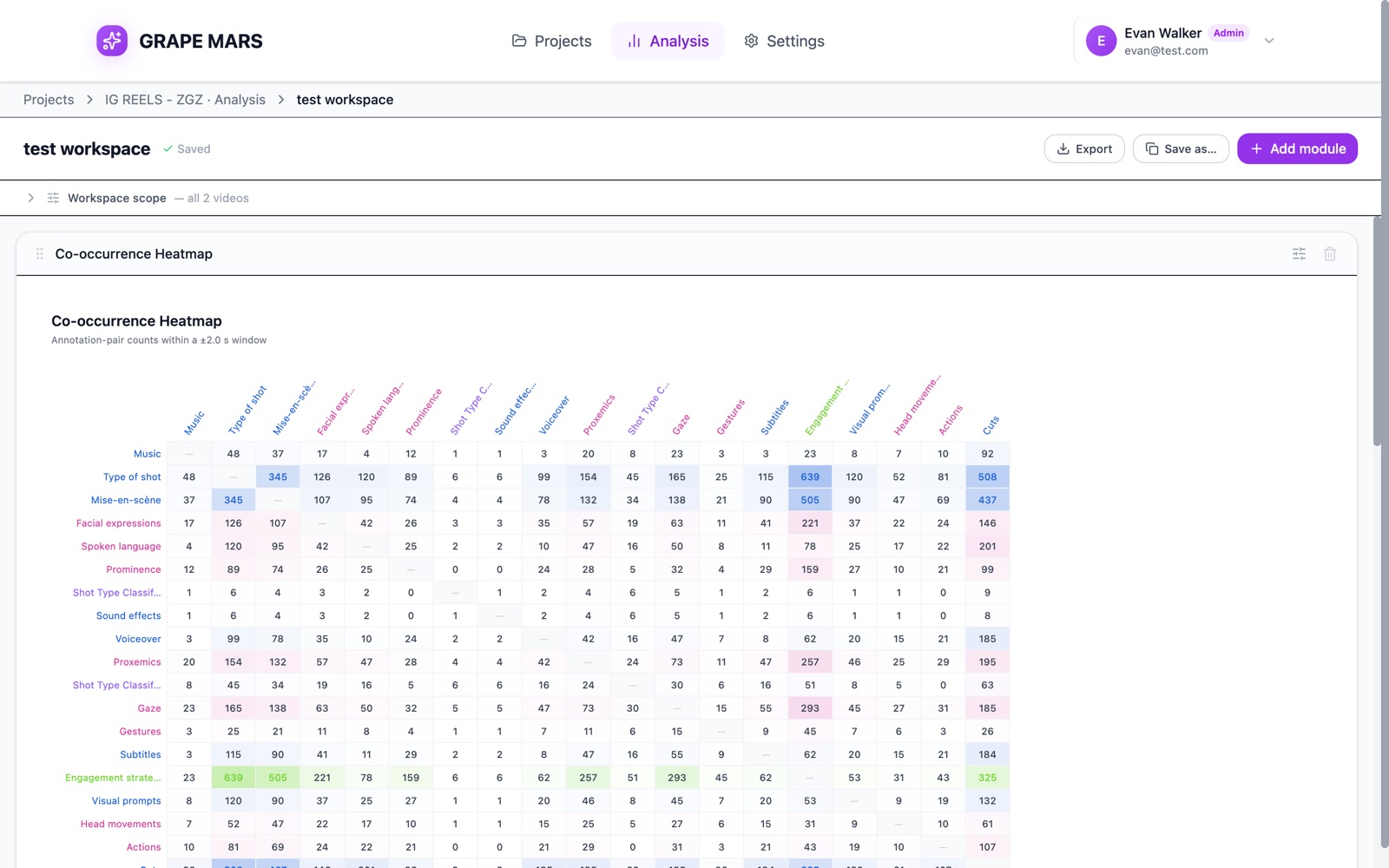
- Trail: Projects, then the project name and Analysis, then the name of this page.
- Title: click it to rename the page.
- Save state: next to the title. It reads Saved, Saving…, Unsaved changes, or "Save failed — retrying".
- Export: writes an Excel file with one sheet per module. Grey until you add a module.
- Save as…: makes a copy of this page, named with "(copy)" at the end, and opens it.
- Add module: opens the drawer of modules on the right.
- Workspace scope: a bar you can open and close. It sets the videos, the fragment, the tracks and the coders for the whole page. Its 4 groups are Videos, Fragment, Tiers and Coders. Closed, it shows a short summary.
- The page: your modules, one under the other, in the order you set.
- Module title bar: a drag handle at the left, the module name, a settings button, and a bin.
- Overriding chip: a small amber chip that appears when the module leaves the page scope.
An empty page shows "An empty workspace" and a button named Add your first module.
The drawer on the right is headed "Add a module". Drag a name onto the page, or click the + at its right to put it at the end. A grey name needs one single video.
A green bar appears under the header after an export. It names the file and counts the sheets.