Appearance
Create an account
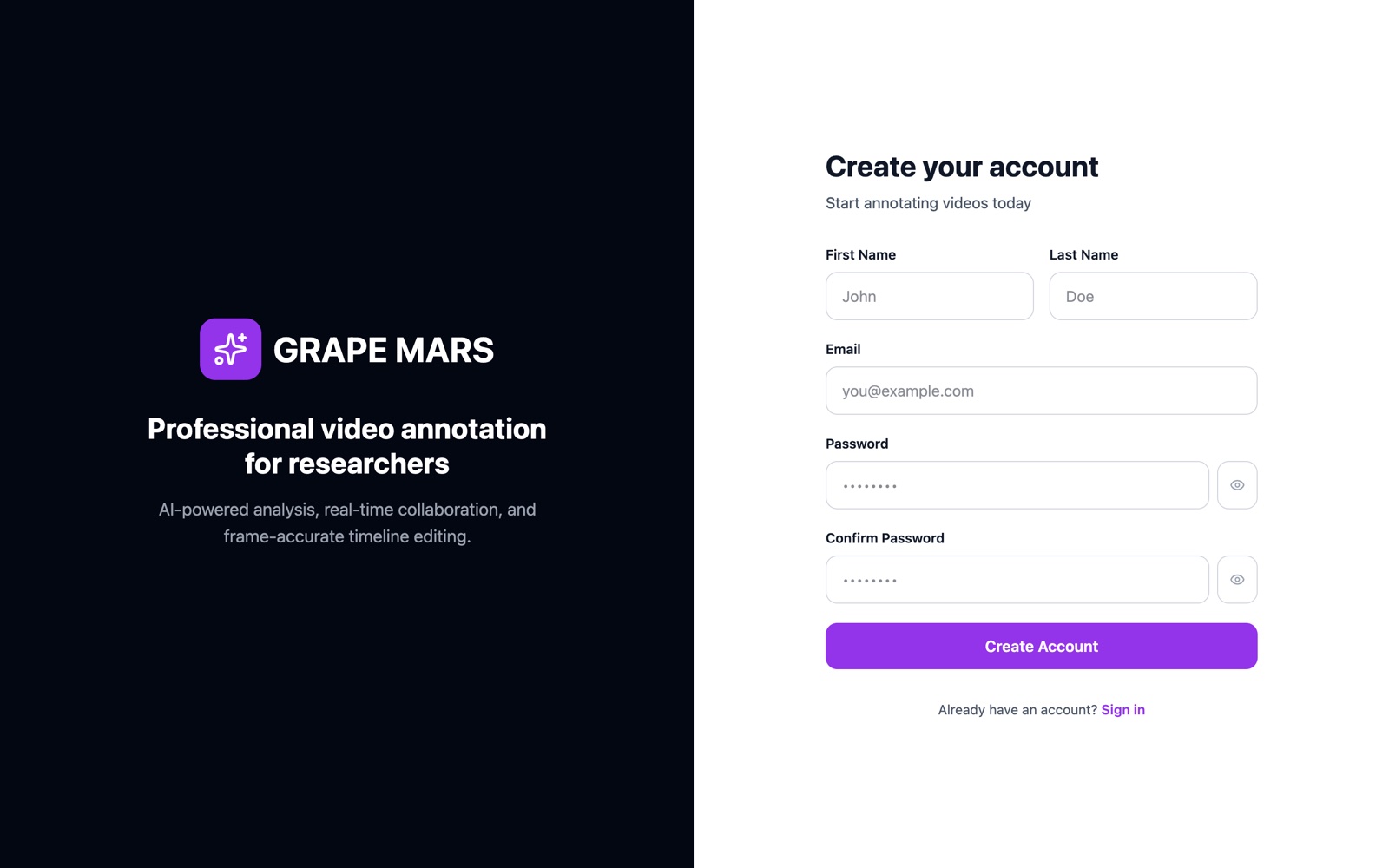
Make your own GRAPE MARS account and sign in for the first time. Most people get an account from their administrator instead.
Before you start
- Ask your administrator for the web address of the site. Your administrator gives most people an account.
- Have an email address that only you use.
Steps
- Open the site. The sign-in page opens.
- Type
/registerat the end of the web address. The page reads Create your account. - Type your given name in First Name. The box holds your name as you type.
- Type your family name in Last Name. The 2 name boxes sit side by side.
- Type your email in Email. Type it in lower case, with no spaces.
- Type a new password in Password. A list of 4 rules opens under the box.
- Wait for all 4 rules to turn green. You need 8 characters or more, one capital letter, one small letter, and one number.
- Type the same password in Confirm Password. The 2 passwords must match.
- Click Create Account. GRAPE MARS signs you in and opens your projects.
To read your password as you type it, click the eye icon at the right of the box.
Check it worked
Your name shows at the top right of the page. The projects page is open.
If something goes wrong
Email already registeredPasswords do not match- I do not know which email to use
- I cannot see the password I am typing